Day 2: Networking, Browsers, API Keys, and OAuth
May 29, 2026
What I worked on
- Studied web networking
- Studied browser internals
- Studied API authentication
What I learned
Networking
Websites communicate with each other using Hypertext Transfer Protocol. Some client sends a GET or POST request and gets a response back from whatever server they sent it to. Some application on your computer asks your operating system to do networking calls, and you magically get back a response from the server with a status code and optionally data you requested.
When you send requests using http, you have to follow a certain structure looking something like this: https://gmail.com/, where https is the scheme, gmail.com is the host, and anything past the forward slash is the path. The default path is /, and each website defines where that path leads (usually to the website homepage).
What are the steps though? How does typing gmail.com allow us to communicate with Google?
First, your browser (like Google Chrome), calls an OS function: getaddrinfo(gmail.com). Your OS does some magic, and spits out the IP address: 142.250.80.69. Chrome tells the OS to open a socket to that IP on port 443 (the default for https). After that, there’s a stream set up where Google Chrome can communicate with Google’s servers (hosting gmail.com). Then, encryption is set up through the Transport Layer Security. Then, Google’s servers read your request and send a response. In this case, Google Chrome receives HTTP/1.1 301 Moved Permanently, because gmail.com redirects to mail.google.com. Then, Chrome repeats the whole process with mail.google.com. Eventually, we’ll get an HTML page, which Chrome parses and renders.
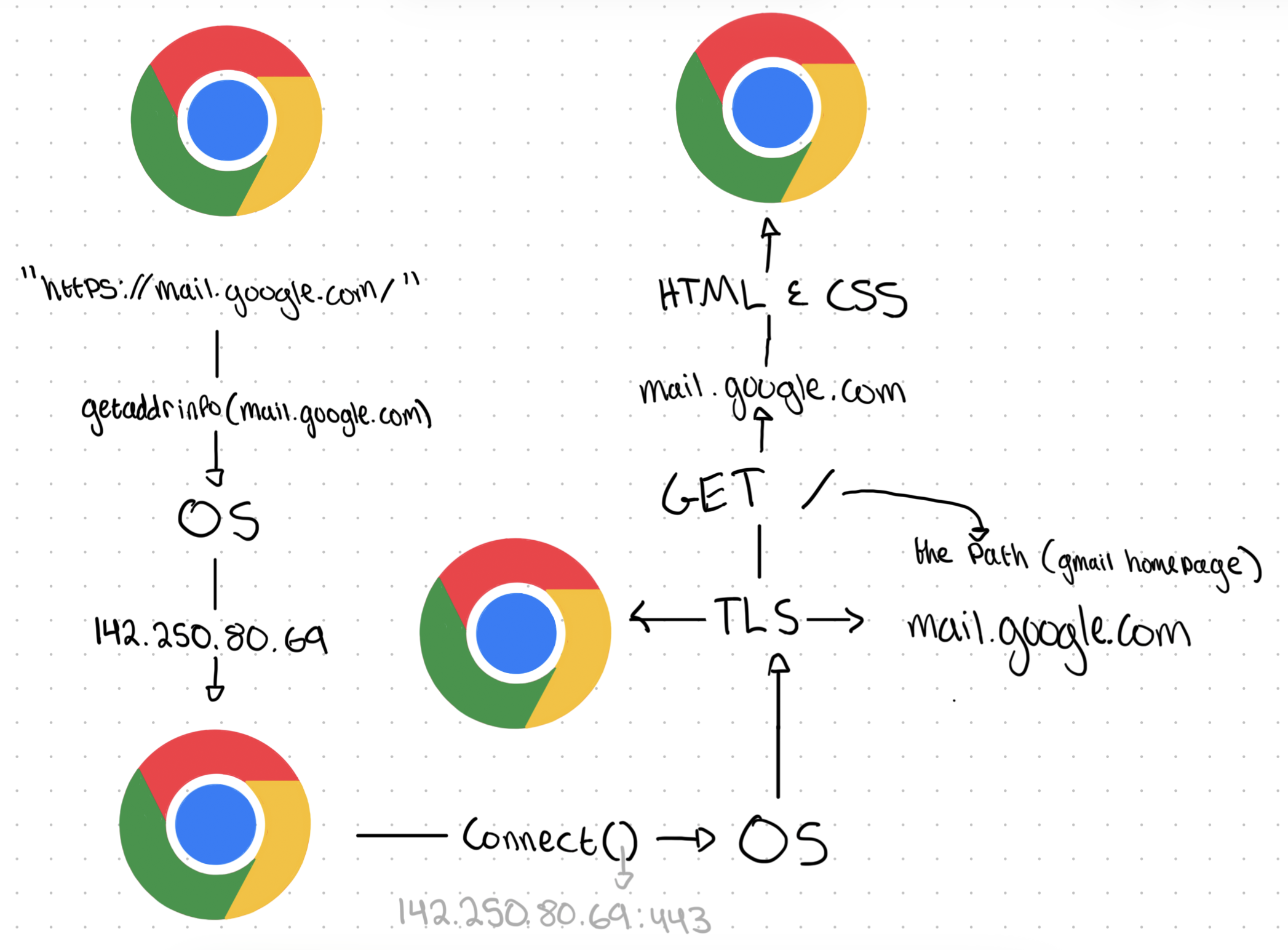
Browsers
I know some examples of browsers, like Google Chrome, Safari, and Firefox, but what do they do?
Three things:
- Makes network calls
- Renders HTML and CSS
- Runs JavaScript (ECMAScript, actually 🤓)
Network calls
We already touched on this, but whenever you enter a domain name, like google.com, your browser is how you communicate with the server that provides that website. It handles communication with your OS, calling functions like getaddrinfo() and connect().

That little search bar in Google Chrome is where you put in the URL of a website you want to visit, and then Chrome runs those OS functions to establish connections and retrieve HTML and CSS for you.
But Zach, you can search up random terms and get search results
Yeah, that’s because if you didn’t input a URL, it redirects to your default configured search engine, and then adds your query to the URL.
Rendering
Once the HTML arrives, after the networking calls, the browser turns it into pixels through a few steps:
- Parse HTML and CSS, and convert into a structured tree, called the Document Object Model (DOM).
- For all elements parsed, figure out where on the page they go (x and y positions)
- Paint all the elements corresponding to the styling rules (colors, borders, backgrounds)
JavaScript
Without JavaScript, all webpages would be static: you wouldn’t be able to interact with them. JavaScript allows websites to define how the user can interact with their website. Clicks, text input, and mouse position can all be tracked and used with JavaScript.
How does it run?
All browsers ship with a JavaScript Engine. For Google Chrome it’s called V8, and in WebKit (Safari), it’s called JavaScriptCore.
The engine takes JavaScript from your HTML page (through <script> tags), compiles it to machine code (binary) and executes it.
API and OAuth
What’s an API?
an Application Programming Interface is a contract that web servers expose, with a set of (method, path) pairs, and how it responds to them.
Ex: GET https://mail.google.com/primary/, GET https://mail.google.com/events
That list is usually made public through documentation.
An important clarification is that even though API implies the contract is only used for programmatic interactions, endpoints that regular users access, such as /, or /index.html, count as endpoints OF the Application Programming Interface. So technically, every web server has an API.
Typically, when people talk about APIs they mean the set of (method, path) pairs deliberately designed to communicate with other programs. Usually programs with APIs return JSON instead of HTML and CSS.
HTTP is how you transport requests, and the API explains what requests you can send.
What’s an API Key?
Let’s say you’re running a server. You provide a secret pumpkin pie recipe, and you only want to give it to people who you know. Without API Keys, you would get a request from an IP address, but you wouldn’t be able to identify who sent that request. Even if your friend tells you their IP address and you add it to your whitelist, their external IP address could change at any point.
Instead, you can give your friend an API Key, some long string of letters and digits. You store it in your database, and then they send a request to your server with the API Key, you verify with your database, and supply them with the secret recipe.
That’s what API Keys are used for. A web server provides you with a credential that you store somewhere, and you attach that credential when you send requests to that web server.
what does the request look like with the API Key?
There are three ways to include API Keys in requests:
- Query parameters
- Authorization headers
- Custom headers
Query Parameters
Remember that new URL that Chrome made when I entered ‘wow!’ ?

That q=wow! after the ? is called a query parameter, and it’s used to give extra information when talking to a web server. The ? marks where the query string (all query parameters) begins, and multiple query parameters are separated by &.

Once received, Google’s servers parse them into a dictionary.
{q: "wow!", oq: "wow!", sourceid: "chrome", ie: "UTF-8"}
Google uses these parameters to personalize the experience. Instead of just requesting the HTML and CSS at the /search path, users can give Google extra information, and Google can change the response.
API Keys are commonly entered in the query string as a query parameter. The only difference is the URL is constructed programmatically instead of being manually typed into the search bar. Functionally though, it’s very similar. The same steps are called when you try to connect to a web server with the programmatically constructed URL: getaddrinfo(domain), connect(IP:443), the TLS handshake, and HTTP request all happen.
Authorization Headers
In every HTTP request, the structure looks like this:
- Request line:
GET / HTTP/1.1 - Headers:
Host: google.com - Empty Line separating headers from the body
- Body: data to insert if using POST/PUT/PATCH methods
In the query parameter method, the API key goes in the request line. If instead you’re using the authorization header method, the API key is added as a header.
The end result is the same, web servers just parse the API key out differently.
The header typically looks like this: Authorization: Bearer AIzaSyD-9tSrke72PouQMnMX
Authorization is the standard for telling the web server that you included a header used to for verifying your application has access, and BEARER is used to tell the web server that you have a key that’s supposed to give you direct access. In other words:
‘I am the bearer of this key, which is supposed to give me special access to something’
Custom Headers
Some APIs invent their own header for processing API Keys, instead of using Authorization. In this case, API designers pick their own header name, and document it. Developers read the documentation and make sure their requests use the right header.
Example:
GET /v1/forecast?city=NYC HTTP/1.1
Host: api.weather.example
X-Api-Key: AIzaSyD-9tSrke72PouQMnMX
Why would you ever want to use a custom header?
Sometimes servers want to reserve Authorization for something else, like a token given at the start of a session for user auth.
What’s OAuth?

The issue with API Keys
API Keys identify an application, not a user. What if a web server wants specific users to access their data, using your application? An API Key by itself can’t represent hundreds of users on your application.
To set up Google Calendar integration, for example, Calenduel needs to request Google Calendar’s servers, provide evidence that the user has given permission, and then retrieve the user’s sensitive calendar events.
It seems like the only way to make this work would be to ask the web service for an individual API Key for every user.
That’s basically what Open Authorization (OAuth) is. You send the user to login to their account, and then they’re prompted to give your application access to their information, and if they click Allow, they’re redirected to one of your endpoints with a token, and some miscellaneous info. You use that token in the Authorization: header instead of one API key for all your users.
Let’s go through the full flow assuming you want to access a user’s Google Calendar events:
The user clicks on Connect Google Calendar. Your website’s JS tells the browser to make an HTTP request:
GET /o/oauth2/v2/auth?... HTTP/1.1
Host: accounts.google.com
...
The user sees the resulting page, logs in to their Google account, selects scopes to allow the application to access, and then clicks Allow. Then, Google’s webpage
redirects to your website by giving a specific HTTP response:
HTTP/1.1 302 Found
Location: https://calenduel.com/auth/callback#access_token=...&token_type=Bearer&expires_in=3599&scope=https://www.googleapis.com/auth/calendar.readonly
That tells the browser ‘I know what webpage you’re looking for, and it’s at this location’, or in other words it just redirects to a new URL.
The little # character indicates a URL fragment, which lives in the browser, not the server. You may have noticed it to indicate which heading to start at in a
webpage:

That’s because the browser determines at what position to display the content, the server gives the HTML and CSS, and the browser determines what section the user should see.
Once the user is redirected to your website with the access_token, the browser stores the token at
window.location.hash, some location in your browser.
From that point on, the JS code from the web server running locally on your machine will ask the browser to get the user’s data from www.googleapis.com with the locally stored token.
GET /calendar/v3/calendars/primary/events HTTP/1.1
Host: www.googleapis.com
Authorization: Bearer ya29.a0AfH6...
If www.googleapis.com verifies your token is valid, it will respond with status code 200, and with the user’s events in JSON, in the body part of the response.
Then, as the application developer, you can use fetch() with query parameters to get whatever data you want.
What’s still confusing
What are the differences between http and https?
How does TLS work?
How does the OS do the magical commands it provides, like connect() and getaddrinfo()?
How does the browser run JavaScript on your hardware through V8?
How does a web server request, with all the different parts in the structure, get eventually read and parsed?
What happens if you give the correct request line, but an invalid header? Does it just ignore it?
How does browser storage actually work? Where is window.location.hash stored?